Tuesday, November 3, 2026
Watch Live
UPDATED
FUEL PRICE
04-NOV-2026
PETROL
▼ -5.45 PKR
Rs. 369.06/ltr
DIESEL
▲ +3.68 PKR
Rs. 395.20/ltr
Headlines
Pakistan successfully tests first indigenous Fa’az air-to-air missile, military says Winter smog may accelerate skin aging, experts warn of wrinkles and spots Federal Govt cuts petrol price by Rs5.45 per litre Elon Musk leads billionaire donors backing Republican candidates Pakistan leads global YouTube race with 560 million daily views Security forces kill 17 militants and foil blockade in twin Balochistan operations says ISPR US midterm polling faces technical and weather-related disruptions No relaxation on 2D barcode enforcement, warns Health Minister Mustafa Kamal Trump privately fears Democrats could take control of Congress, report says Jennie makes animated film debut with award-nominated Netflix track 33 countries issue emergency stockpiling guidelines for citizens Pakistan to hold Rs1500 prize bond draw in Hyderabad on Nov 16 Two policemen martyred in attack on anti-polio campaign in KP Jerry Fort's final wish to play GTA 6 ends in heartbreak Karoline Leavitt calls upcoming US midterms “most important” in American history Maryam Nawaz unveils 127 Attock projects, challenges Chaudhry Salik over corruption claims PM Shehbaz Sharif calls high-level meeting to review situation in KP US consortium proposes $4.4 billion LNG project in Pakistan Pakistan successfully tests first indigenous Fa’az air-to-air missile, military says Winter smog may accelerate skin aging, experts warn of wrinkles and spots Federal Govt cuts petrol price by Rs5.45 per litre Elon Musk leads billionaire donors backing Republican candidates Pakistan leads global YouTube race with 560 million daily views Security forces kill 17 militants and foil blockade in twin Balochistan operations says ISPR US midterm polling faces technical and weather-related disruptions No relaxation on 2D barcode enforcement, warns Health Minister Mustafa Kamal Trump privately fears Democrats could take control of Congress, report says Jennie makes animated film debut with award-nominated Netflix track 33 countries issue emergency stockpiling guidelines for citizens Pakistan to hold Rs1500 prize bond draw in Hyderabad on Nov 16 Two policemen martyred in attack on anti-polio campaign in KP Jerry Fort's final wish to play GTA 6 ends in heartbreak Karoline Leavitt calls upcoming US midterms “most important” in American history Maryam Nawaz unveils 127 Attock projects, challenges Chaudhry Salik over corruption claims PM Shehbaz Sharif calls high-level meeting to review situation in KP US consortium proposes $4.4 billion LNG project in Pakistan

Here's How to Download Samsung Galaxy S24's FHD Wallpapers

Here's How to Download Samsung Galaxy S24's FHD Wallpapers

  • Samsung Galaxy S24 boasts cutting-edge features and stylish designs.
  • Beautiful crystal pattern wallpapers pre-installed on the Galaxy S24.
  • Wallpapers subtle yet eye-catching, complementing the S24's premium quality.
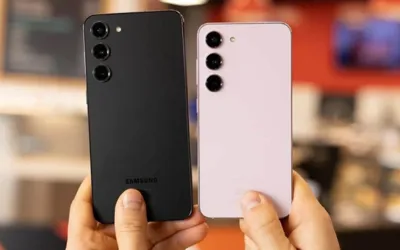
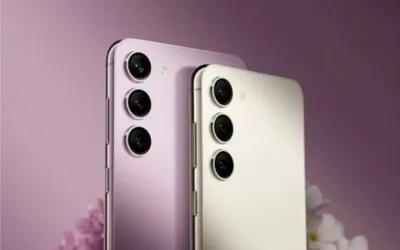
Anticipated to become one of the most sought-after smartphone collections in 2024, the Samsung Galaxy S24 series boasts state-of-the-art features and contemporary, stylish designs. The allure of these devices is heightened by the inclusion of stunning stock wallpapers that are preinstalled on the Galaxy S24.

The minimalist wallpapers showcase stylish crystal patterns in hues that complement the various color choices of the Galaxy S24. Despite their subtle appearance, these wallpapers strike a balance, capturing attention effectively. Their sophisticated aura complements the premium quality of the S24 series seamlessly.

Even those who don’t own a Galaxy S24 device can appreciate and enjoy these wallpapers. Their simple elegance makes them versatile enough to enhance nearly any smartphone or computer desktop.

Samsung facilitates the enhancement of personal tech devices with a touch of Galaxy S24 style by providing these wallpapers as complimentary downloads, making them easily accessible to everyone.

Samsung Galaxy S24 Wallpapers

The wallpapers designed for the Galaxy S24 are tailored to perfectly align with the specific display dimensions of each corresponding model. In the case of the S24 Plus and S24 Ultra, equipped with QHD+ resolution displays, the wallpapers are crafted with a matching high resolution of 2560x1440.

The regular Galaxy S24 features a Full HD+ resolution of 2400x1080, and consequently, wallpapers designed for this model would adhere to these specific dimensions. Additionally, across the entire S24 lineup, the aspect ratio remains consistent with the contemporary tall-and-narrow display ratio, approximately 19.5:9.

Having precise information about the resolution and aspect ratio of the wallpapers simplifies the process of assessing compatibility with a variety of smartphone brands and models. In general, the S24 wallpapers are expected to display well on most recent phones released in the last 2-3 years.

How to Download Samsung Galaxy S24 Wallpapers

Due to the efforts of technology leakers and bloggers, the wallpapers for the Galaxy S24 are readily accessible for download, even before the official release of the phones. Here is a detailed guide on how to easily incorporate these wallpapers onto your devices:

On a smartphone

  1. Open your mobile browser and navigate to the page hosting the S24 wallpaper downloads.
  2. Tap the download button below your desired wallpaper image.
  3. Confirm the download when prompted.
  4. Open your Photos app to access and set the new wallpaper.

On a computer

  1. Right click the wallpaper you want and select “Save image as.”
  2. Choose a memorable name and location to save the wallpaper.
  3. Transfer the saved file to your smartphone using a USB cable or cloud storage service.
  4. Open the photo from your device and set it as wallpaper.
Aside from using USB cables and cloud storage, Bluetooth provides a convenient wireless alternative for transferring downloaded computer wallpapers to your mobile device. Just establish a connection between your computer and smartphone via Bluetooth, and proceed to send the wallpaper files to your phone.

[caption id="attachment_1007073" align="alignnone" width="640"]Here's How to Download Samsung Galaxy S24's FHD Wallpapers Here's How to Download Samsung Galaxy S24's FHD Wallpapers[/caption]

Download Samsung Galaxy S24 FHD Wallpapers

To easily share the Galaxy S24 wallpapers with friends, you can effortlessly distribute the file attachments via email or share a public link through cloud storage services. Messaging applications such as WhatsApp also efficiently support the sharing of media files among contacts.

How to Set Up Samsung Galaxy S24 Wallpapers

Customizing your Android home screen is simple with the Galaxy S24 wallpapers:
  1. Launch the Settings app
  2. Tap Wallpaper
  3. Tap Add New Wallpaper
  4. Select a downloaded S24 wallpaper
  5. Pinch and zoom to set the crop
  6. Tap Set Wallpaper
Alternatively, you can long-press on an empty area on your home screen and select "Wallpapers" from the displayed menu. Follow similar steps to choose and personalize a new background for your Galaxy S24.

[embedpost slug="/heres-how-to-hide-pictures-on-an-iphone/"]

Set up Samsung Galaxy S24 wallpapers on iOS devices

iPhone and iPad users can also set awesome Galaxy S24 wallpapers in just a few taps:
  1. Go to Settings > Wallpaper > Choose New Wallpaper
  2. Select the Albums tab
  3. Tap the album containing the downloaded wallpaper
  4. Pinch and zoom to set the crop
  5. Tap Set
  6. Choose whether to set it as a Lock screen, Home screen, or Both
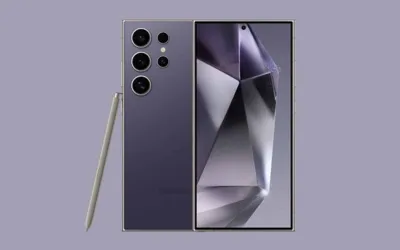
With either mobile operating system, you can quickly equip yourself with a stylish new wallpaper inspired by the Galaxy in no time!

Recommended